前言
在現代雲端架構設計中,公私有網路分離是資訊安全的基石。透過將基礎設施劃分為公有子網路(Public Subnet)與私有子網路(Private Subnet),我們能夠實現以下關鍵安全目標:
- 縱深防禦(Defense in Depth):多層網路隔離可防止攻擊者直接觸及核心系統
- 最小暴露原則:僅將必要的服務暴露於公網,減少攻擊面
- 合規性需求:許多產業標準(如 PCI-DSS、HIPAA)要求敏感資料必須存放於隔離網路
- 流量控制:精確控制進出流量,便於稽核與監控
本文將透過 Terraform 實作一個完整的 AWS 公私有網路架構,涵蓋 VPC、子網路、路由表、網際網路閘道、安全群組等核心元件的設定。
網路架構概覽
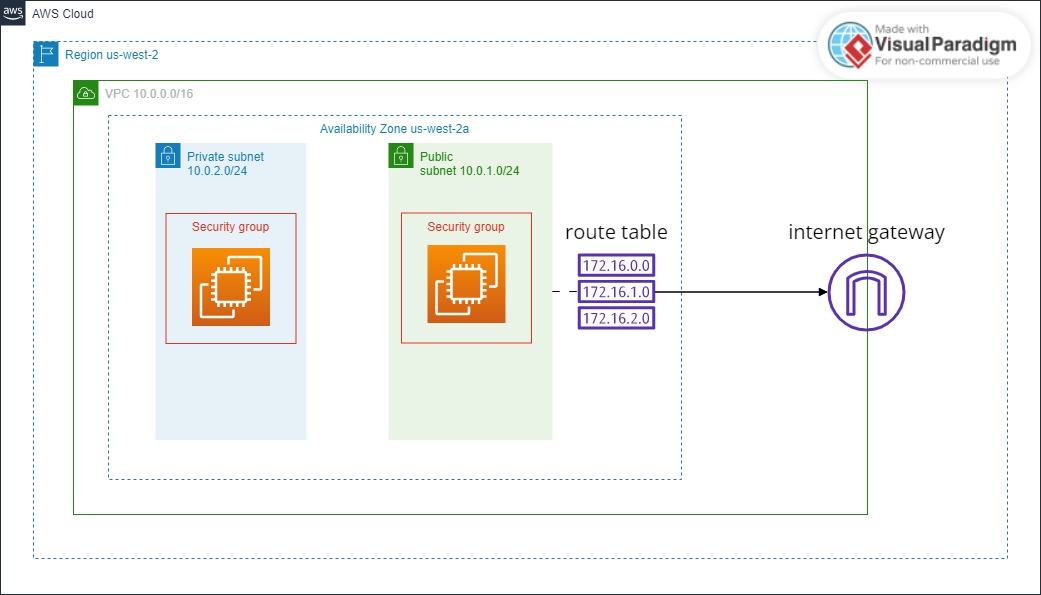
以下為本文實作的網路架構示意圖:
 1
 2
 3
 4
 5
 6
 7
 8
 9
10
11
12
13
14
15
16
17
18
19
20
21
22
23
24
25
26
27
28
29
30
31
32
| ┌─────────────────────────────────────────────────────────┐
│ Internet │
└───────────────────────────┬─────────────────────────────┘
│
▼
┌───────────────────────────────────────────────────────────┐
│ Internet Gateway (IGW) │
└───────────────────────────┬───────────────────────────────┘
│
┌─────────────────────────────────────────────────────┼─────────────────────────────────────────────────────┐
│ │ VPC: 10.0.0.0/16 │
│ │ │
│ ┌──────────────────────────────────────────────────┼────────────────────────────────────────────────────┐ │
│ │ │ us-west-2a │ │
│ │ │ │ │
│ │ ┌───────────────────────────────────┐ │ ┌───────────────────────────────────┐ │ │
│ │ │ Public Subnet: 10.0.1.0/24 │ │ │ Private Subnet: 10.0.2.0/24 │ │ │
│ │ │ │ │ │ │ │ │
│ │ │ ┌─────────────────────────────┐ │ │ │ ┌─────────────────────────────┐ │ │ │
│ │ │ │ EC2 (Bastion Host) │◄─┼──────────┘ │ │ EC2 (Private) │ │ │ │
│ │ │ │ Public IP: Yes │ │ │ │ Public IP: No │ │ │ │
│ │ │ └──────────────┬──────────────┘ │ │ └──────────────▲──────────────┘ │ │ │
│ │ │ │ │ │ │ │ │ │
│ │ │ │ │ SSH via │ │ │ │ │
│ │ │ └─────────────────┼─────────────────────┼─────────────────┘ │ │ │
│ │ │ │ Private IP │ │ │ │
│ │ │ Route Table: 0.0.0.0/0 → IGW │ │ Route Table: Local only │ │ │
│ │ └───────────────────────────────────┘ └───────────────────────────────────┘ │ │
│ │ │ │
│ └─────────────────────────────────────────────────────────────────────────────────────────────────────────┘ │
│ │
└───────────────────────────────────────────────────────────────────────────────────────────────────────────────┘
|
架構說明
| 元件 | 說明 |
|---|
| VPC | 虛擬私有雲,CIDR 為 10.0.0.0/16,提供 65,536 個 IP 位址 |
| Public Subnet | 公有子網路,可透過 IGW 連接網際網路 |
| Private Subnet | 私有子網路,無法直接連接網際網路 |
| Internet Gateway | 網際網路閘道,連接 VPC 與網際網路 |
| Route Table | 路由表,控制網路流量方向 |
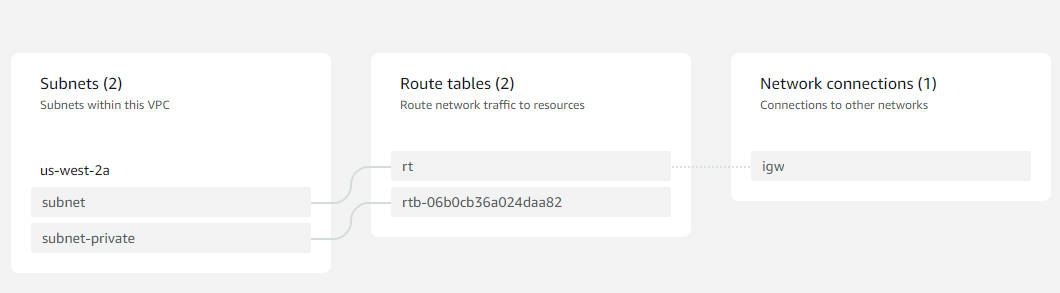
示意圖
1. Provider 設定
1
2
3
| provider "aws" {
region = "us-west-2"
}
|
Provider 區塊定義了我們要使用的雲端服務提供商及其區域。選擇適當的區域對於延遲、合規性和成本都有影響。
2. VPC(Virtual Private Cloud)
 1
 2
 3
 4
 5
 6
 7
 8
 9
10
| resource "aws_vpc" "vpc" {
cidr_block = "10.0.0.0/16"
enable_dns_hostnames = true
enable_dns_support = true
tags = {
Name = "vpc"
Environment = "production"
}
}
|
VPC 是 AWS 網路架構的基礎,它提供了一個邏輯隔離的虛擬網路環境。
- cidr_block:定義 VPC 的 IP 位址範圍,/16 提供 65,536 個可用 IP
- enable_dns_hostnames:啟用 DNS 主機名稱,便於透過 DNS 名稱連接執行個體
- enable_dns_support:啟用 DNS 解析支援
3. 公有子網路(Public Subnet)
 1
 2
 3
 4
 5
 6
 7
 8
 9
10
11
| resource "aws_subnet" "subnet" {
vpc_id = aws_vpc.vpc.id
cidr_block = "10.0.1.0/24"
availability_zone = "us-west-2a"
map_public_ip_on_launch = true
tags = {
Name = "public-subnet"
Type = "public"
}
}
|
公有子網路的特點:
- map_public_ip_on_launch = true:在此子網路啟動的執行個體會自動獲得公有 IP
- 透過路由表連接到 Internet Gateway,可存取網際網路
- 適合放置 Load Balancer、Bastion Host、NAT Gateway 等需要公網存取的服務
4. 私有子網路(Private Subnet)
 1
 2
 3
 4
 5
 6
 7
 8
 9
10
| resource "aws_subnet" "subnet-private" {
vpc_id = aws_vpc.vpc.id
cidr_block = "10.0.2.0/24"
availability_zone = "us-west-2a"
tags = {
Name = "private-subnet"
Type = "private"
}
}
|
私有子網路的特點:
- 無 map_public_ip_on_launch:執行個體不會獲得公有 IP
- 使用預設路由表或自訂的私有路由表
- 適合放置資料庫、應用程式伺服器、快取服務等不需直接暴露於公網的資源
5. Internet Gateway
1
2
3
4
5
6
7
| resource "aws_internet_gateway" "igw" {
vpc_id = aws_vpc.vpc.id
tags = {
Name = "igw"
}
}
|
Internet Gateway 是 VPC 與網際網路之間的橋樑:
- 每個 VPC 只能連接一個 IGW
- 提供雙向通訊能力(對外連線與接受連入)
- 自動處理 NAT(Network Address Translation)將私有 IP 轉換為公有 IP
6. 路由表(Route Table)
1
2
3
4
5
6
7
8
9
10
11
12
13
14
15
16
17
| resource "aws_route_table" "rt" {
vpc_id = aws_vpc.vpc.id
route {
cidr_block = "0.0.0.0/0"
gateway_id = aws_internet_gateway.igw.id
}
tags = {
Name = "public-route-table"
}
}
resource "aws_route_table_association" "rta" {
subnet_id = aws_subnet.subnet.id
route_table_id = aws_route_table.rt.id
}
|
路由表決定網路流量的走向:
- 0.0.0.0/0 → IGW:所有非本地流量都送往 Internet Gateway
- 透過
aws_route_table_association 將路由表與子網路關聯 - 私有子網路不關聯此路由表,因此無法存取網際網路
7. 安全群組(Security Group)
1
2
3
4
5
6
7
8
9
10
11
12
13
14
15
16
17
18
19
20
21
22
23
24
25
| resource "aws_security_group" "sg" {
name = "sg"
description = "Security group for public instances"
vpc_id = aws_vpc.vpc.id
ingress {
from_port = 22
to_port = 22
protocol = "tcp"
cidr_blocks = ["0.0.0.0/0"]
description = "SSH access"
}
egress {
from_port = 0
to_port = 0
protocol = "-1"
cidr_blocks = ["0.0.0.0/0"]
description = "Allow all outbound traffic"
}
tags = {
Name = "sg"
}
}
|
安全群組是執行個體層級的虛擬防火牆:
- Stateful:允許的連入流量,其回應流量會自動被允許
- ingress:控制連入流量規則
- egress:控制連出流量規則
8. EC2 執行個體
1
2
3
4
5
6
7
8
9
10
11
12
13
14
15
16
17
18
19
20
21
22
23
| resource "aws_instance" "ec2" {
ami = "ami-0747e613a2a1ff483"
instance_type = "t2.micro"
key_name = "demo-key-us-west-2"
subnet_id = aws_subnet.subnet.id
vpc_security_group_ids = [aws_security_group.sg.id]
tags = {
Name = "ec2-public"
}
}
resource "aws_instance" "ec2-private" {
ami = "ami-0747e613a2a1ff483"
instance_type = "t2.micro"
key_name = "demo-key-us-west-2"
subnet_id = aws_subnet.subnet-private.id
vpc_security_group_ids = [aws_security_group.sg.id]
tags = {
Name = "ec2-private"
}
}
|
1
2
3
4
5
6
7
8
9
10
11
12
13
14
15
16
17
18
19
20
21
22
23
24
25
26
27
28
29
30
31
32
33
34
35
36
37
38
39
40
41
42
43
44
45
46
47
48
49
50
51
52
53
54
55
56
57
58
59
60
61
62
63
64
65
66
67
68
69
70
71
72
73
74
75
76
77
78
79
80
81
82
83
84
85
86
87
88
89
90
91
92
93
94
95
96
| provider "aws" {
region = "us-west-2"
}
resource "aws_vpc" "vpc" {
cidr_block = "10.0.0.0/16"
tags = {
Name = "vpc"
}
}
resource "aws_subnet" "subnet" {
vpc_id = aws_vpc.vpc.id
cidr_block = "10.0.1.0/24"
availability_zone = "us-west-2a"
map_public_ip_on_launch = true
tags = {
Name = "subnet"
}
}
resource "aws_subnet" "subnet-private" {
vpc_id = aws_vpc.vpc.id
cidr_block = "10.0.2.0/24"
availability_zone = "us-west-2a"
tags = {
Name = "subnet-private"
}
}
resource "aws_route_table_association" "rta" {
subnet_id = aws_subnet.subnet.id
route_table_id = aws_route_table.rt.id
}
resource "aws_route_table" "rt" {
vpc_id = aws_vpc.vpc.id
route {
cidr_block = "0.0.0.0/0"
gateway_id = aws_internet_gateway.igw.id
}
tags = {
Name = "rt"
}
}
resource "aws_internet_gateway" "igw" {
  vpc_id = aws_vpc.vpc.id

  tags = {
    Name = "igw"
  }
}
resource "aws_security_group" "sg" {
name = "sg"
vpc_id = aws_vpc.vpc.id
ingress {
from_port = 22
to_port = 22
protocol = "tcp"
cidr_blocks = ["0.0.0.0/0"]
}
egress {
from_port = 0
to_port = 0
protocol = "-1"
cidr_blocks = ["0.0.0.0/0"]
}
tags = {
Name = "sg"
}
}
resource "aws_instance" "ec2" {
ami = "ami-0747e613a2a1ff483"
instance_type = "t2.micro"
key_name = "demo-key-us-west-2"
subnet_id = aws_subnet.subnet.id
vpc_security_group_ids = [aws_security_group.sg.id]
tags = {
Name = "ec2"
}
}
resource "aws_instance" "ec2-private" {
ami = "ami-0747e613a2a1ff483"
instance_type = "t2.micro"
key_name = "demo-key-us-west-2"
subnet_id = aws_subnet.subnet-private.id
vpc_security_group_ids = [aws_security_group.sg.id]
tags = {
Name = "ec2-private"
}
}
|
安全群組設計最佳實務
分層安全群組架構
在生產環境中,建議為不同用途的資源建立獨立的安全群組:
 1
 2
 3
 4
 5
 6
 7
 8
 9
10
11
12
13
14
15
16
17
18
19
20
21
22
23
24
25
26
27
28
29
30
31
32
33
34
35
36
37
38
39
40
41
42
43
44
45
46
47
48
49
50
51
52
53
54
55
56
57
58
59
60
61
62
63
64
65
66
67
68
69
70
| # Bastion Host 安全群組 - 僅允許特定 IP SSH 連入
resource "aws_security_group" "bastion_sg" {
name = "bastion-sg"
description = "Security group for Bastion Host"
vpc_id = aws_vpc.vpc.id
ingress {
from_port = 22
to_port = 22
protocol = "tcp"
cidr_blocks = ["YOUR_OFFICE_IP/32"] # 限制為辦公室 IP
description = "SSH from office"
}
egress {
from_port = 0
to_port = 0
protocol = "-1"
cidr_blocks = ["0.0.0.0/0"]
}
tags = {
Name = "bastion-sg"
}
}
# 私有執行個體安全群組 - 僅允許從 Bastion 連入
resource "aws_security_group" "private_sg" {
name = "private-sg"
description = "Security group for private instances"
vpc_id = aws_vpc.vpc.id
ingress {
from_port = 22
to_port = 22
protocol = "tcp"
security_groups = [aws_security_group.bastion_sg.id]
description = "SSH from Bastion only"
}
egress {
from_port = 0
to_port = 0
protocol = "-1"
cidr_blocks = ["0.0.0.0/0"]
}
tags = {
Name = "private-sg"
}
}
# 資料庫安全群組 - 僅允許應用層連入
resource "aws_security_group" "database_sg" {
name = "database-sg"
description = "Security group for database"
vpc_id = aws_vpc.vpc.id
ingress {
from_port = 3306
to_port = 3306
protocol = "tcp"
security_groups = [aws_security_group.private_sg.id]
description = "MySQL from application tier"
}
tags = {
Name = "database-sg"
}
}
|
安全群組設計原則
- 最小權限原則:只開放必要的連接埠和來源 IP
- 使用安全群組參照:使用
security_groups 而非 cidr_blocks 來參照其他安全群組 - 加入描述:為每條規則加入
description 便於維護 - 避免使用 0.0.0.0/0:除非絕對必要,否則不要開放所有 IP
- 分離不同角色:為不同用途的資源建立獨立的安全群組
Bastion Host 跳板機設定建議
Bastion Host(跳板機)是連接公網與私有網路的安全橋樑。以下是完整的 Bastion Host 設定:
 1
 2
 3
 4
 5
 6
 7
 8
 9
10
11
12
13
14
15
16
17
18
19
20
21
22
23
24
25
26
27
28
29
30
31
32
33
34
35
36
37
38
39
40
41
42
43
44
45
46
47
48
49
50
51
52
53
54
55
56
| # Bastion Host 執行個體
resource "aws_instance" "bastion" {
ami = "ami-0747e613a2a1ff483"
instance_type = "t2.micro"
key_name = "demo-key-us-west-2"
subnet_id = aws_subnet.subnet.id
vpc_security_group_ids = [aws_security_group.bastion_sg.id]
associate_public_ip_address = true
# 啟用詳細監控
monitoring = true
# 根據需求調整根磁碟
root_block_device {
volume_size = 8
volume_type = "gp3"
encrypted = true
delete_on_termination = true
}
# 使用 User Data 進行初始設定
user_data = <<-EOF
#!/bin/bash
# 更新系統
yum update -y
# 設定 SSH 安全性
sed -i 's/#PermitRootLogin yes/PermitRootLogin no/' /etc/ssh/sshd_config
sed -i 's/#MaxAuthTries 6/MaxAuthTries 3/' /etc/ssh/sshd_config
systemctl restart sshd
# 安裝並啟用 fail2ban
amazon-linux-extras install epel -y
yum install fail2ban -y
systemctl enable fail2ban
systemctl start fail2ban
# 設定自動登出閒置連線
echo "TMOUT=300" >> /etc/profile
EOF
tags = {
Name = "bastion-host"
Role = "bastion"
}
}
# 為 Bastion 分配 Elastic IP(固定公有 IP)
resource "aws_eip" "bastion_eip" {
instance = aws_instance.bastion.id
domain = "vpc"
tags = {
Name = "bastion-eip"
}
}
|
Bastion Host 安全強化建議
- 使用 Elastic IP:固定 IP 便於設定防火牆白名單
- 啟用 MFA:設定多因子驗證增加安全性
- 限制 SSH 來源 IP:只允許已知的辦公室 IP
- 定期輪換金鑰:定期更換 SSH Key Pair
- 啟用 Session Manager:考慮使用 AWS Systems Manager Session Manager 取代 SSH
- 設定連線逾時:閒置連線自動斷開
- 啟用稽核日誌:記錄所有 SSH 連線活動
使用 Session Manager 替代 SSH
更安全的做法是使用 AWS Systems Manager Session Manager:
 1
 2
 3
 4
 5
 6
 7
 8
 9
10
11
12
13
14
15
16
17
18
19
20
21
22
23
24
25
26
27
| # Session Manager 所需的 IAM Role
resource "aws_iam_role" "ssm_role" {
name = "ssm-role"
assume_role_policy = jsonencode({
Version = "2012-10-17"
Statement = [
{
Action = "sts:AssumeRole"
Effect = "Allow"
Principal = {
Service = "ec2.amazonaws.com"
}
}
]
})
}
resource "aws_iam_role_policy_attachment" "ssm_policy" {
role = aws_iam_role.ssm_role.name
policy_arn = "arn:aws:iam::aws:policy/AmazonSSMManagedInstanceCore"
}
resource "aws_iam_instance_profile" "ssm_profile" {
name = "ssm-profile"
role = aws_iam_role.ssm_role.name
}
|
網路 ACL 設定範例
Network ACL(網路存取控制清單)提供子網路層級的額外安全層:
 1
 2
 3
 4
 5
 6
 7
 8
 9
10
11
12
13
14
15
16
17
18
19
20
21
22
23
24
25
26
27
28
29
30
31
32
33
34
35
36
37
38
39
40
41
42
43
44
45
46
47
48
49
50
51
52
53
54
55
56
57
58
59
60
61
62
63
64
65
66
67
68
69
70
71
72
73
74
75
76
77
78
79
80
81
82
83
84
85
86
87
88
89
90
91
92
93
94
95
96
97
98
99
| # 公有子網路的 Network ACL
resource "aws_network_acl" "public_nacl" {
vpc_id = aws_vpc.vpc.id
subnet_ids = [aws_subnet.subnet.id]
# 允許 SSH 連入
ingress {
protocol = "tcp"
rule_no = 100
action = "allow"
cidr_block = "0.0.0.0/0"
from_port = 22
to_port = 22
}
# 允許 HTTP 連入
ingress {
protocol = "tcp"
rule_no = 110
action = "allow"
cidr_block = "0.0.0.0/0"
from_port = 80
to_port = 80
}
# 允許 HTTPS 連入
ingress {
protocol = "tcp"
rule_no = 120
action = "allow"
cidr_block = "0.0.0.0/0"
from_port = 443
to_port = 443
}
# 允許臨時連接埠(回應流量)
ingress {
protocol = "tcp"
rule_no = 130
action = "allow"
cidr_block = "0.0.0.0/0"
from_port = 1024
to_port = 65535
}
# 允許所有連出流量
egress {
protocol = "-1"
rule_no = 100
action = "allow"
cidr_block = "0.0.0.0/0"
from_port = 0
to_port = 0
}
tags = {
Name = "public-nacl"
}
}
# 私有子網路的 Network ACL
resource "aws_network_acl" "private_nacl" {
vpc_id = aws_vpc.vpc.id
subnet_ids = [aws_subnet.subnet-private.id]
# 允許來自 VPC 內部的所有流量
ingress {
protocol = "-1"
rule_no = 100
action = "allow"
cidr_block = "10.0.0.0/16"
from_port = 0
to_port = 0
}
# 拒絕來自外部的直接連線
ingress {
protocol = "-1"
rule_no = 200
action = "deny"
cidr_block = "0.0.0.0/0"
from_port = 0
to_port = 0
}
# 允許連出到 VPC 內部
egress {
protocol = "-1"
rule_no = 100
action = "allow"
cidr_block = "10.0.0.0/16"
from_port = 0
to_port = 0
}
tags = {
Name = "private-nacl"
}
}
|
Network ACL vs Security Group 比較
| 特性 | Network ACL | Security Group |
|---|
| 層級 | 子網路層級 | 執行個體層級 |
| 狀態 | Stateless(需明確設定回應規則) | Stateful(自動允許回應流量) |
| 規則類型 | 允許與拒絕 | 僅允許 |
| 評估順序 | 按規則編號順序 | 評估所有規則 |
| 預設行為 | 拒絕所有 | 拒絕連入,允許連出 |
測試驗證
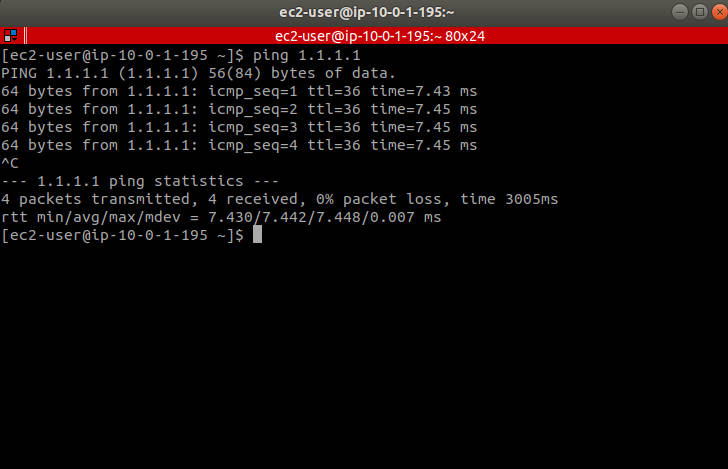
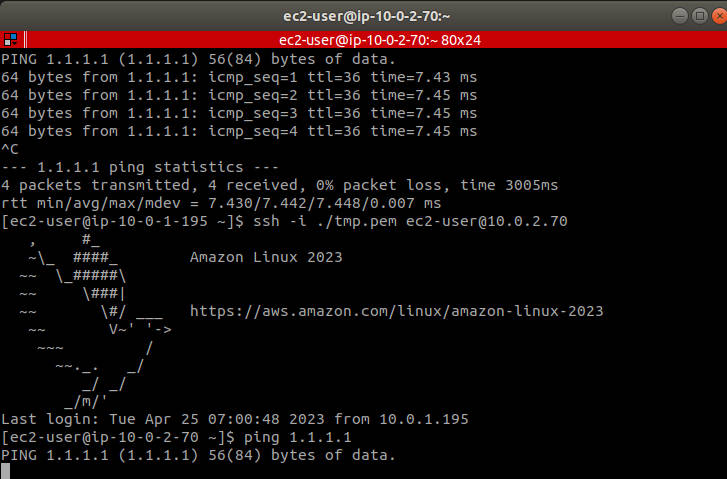
公有子網路連線測試
在 public subnet 中的 ec2 可正常連網:
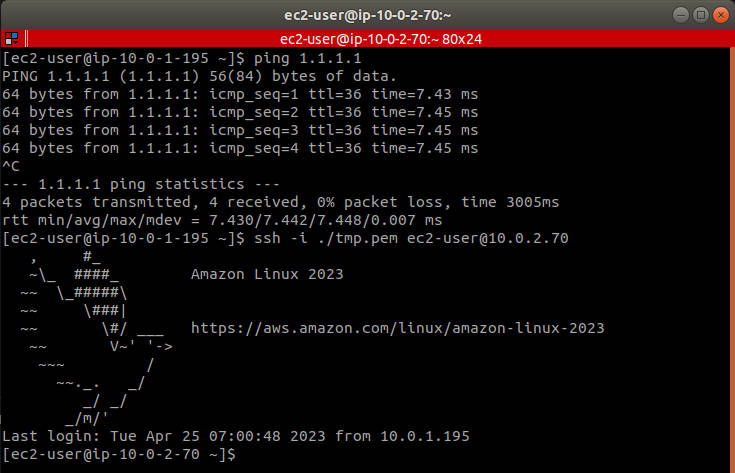
私有子網路連線測試
利用預設路由(也就是 vpc 被建立時就被建立的路由)來透過 public subnet 中的 ec2 連線到 private subnet 中的 ec2:
驗證私有子網路無法連網
在 private subnet 中的 ec2 無法正常連網:
故障排除指南
常見問題 1:無法 SSH 連線到公有 EC2
症狀:SSH 連線逾時
檢查步驟:
1
2
3
4
5
6
7
8
9
10
11
12
13
| # 1. 確認執行個體有公有 IP
aws ec2 describe-instances --instance-ids <instance-id> \
--query 'Reservations[].Instances[].PublicIpAddress'
# 2. 確認安全群組允許 SSH
aws ec2 describe-security-groups --group-ids <sg-id> \
--query 'SecurityGroups[].IpPermissions'
# 3. 確認路由表設定正確
aws ec2 describe-route-tables --route-table-ids <rtb-id>
# 4. 確認 Network ACL 未阻擋
aws ec2 describe-network-acls --network-acl-ids <nacl-id>
|
解決方案:
- 確認
map_public_ip_on_launch = true 或手動分配 Elastic IP - 確認安全群組有 port 22 的 ingress 規則
- 確認路由表有
0.0.0.0/0 → igw 的路由 - 確認 Network ACL 允許 port 22 和臨時連接埠(1024-65535)
常見問題 2:私有 EC2 無法連到網際網路
症狀:私有執行個體無法執行 yum update 或存取外部 API
這是預期行為!私有子網路設計上就是無法直接連網。
解決方案:
如需讓私有執行個體存取網際網路,需要設定 NAT Gateway:
 1
 2
 3
 4
 5
 6
 7
 8
 9
10
11
12
13
14
15
16
17
18
19
20
21
22
23
24
25
26
27
28
29
30
31
32
| # 建立 NAT Gateway
resource "aws_eip" "nat_eip" {
domain = "vpc"
}
resource "aws_nat_gateway" "nat" {
allocation_id = aws_eip.nat_eip.id
subnet_id = aws_subnet.subnet.id # NAT Gateway 放在公有子網路
tags = {
Name = "nat-gateway"
}
}
# 私有子網路路由表
resource "aws_route_table" "private_rt" {
vpc_id = aws_vpc.vpc.id
route {
cidr_block = "0.0.0.0/0"
nat_gateway_id = aws_nat_gateway.nat.id
}
tags = {
Name = "private-route-table"
}
}
resource "aws_route_table_association" "private_rta" {
subnet_id = aws_subnet.subnet-private.id
route_table_id = aws_route_table.private_rt.id
}
|
常見問題 3:從 Bastion 無法 SSH 到私有 EC2
症狀:從 Bastion Host 無法連到私有執行個體
檢查步驟:
- 確認私有執行個體的安全群組允許來自 Bastion 的 SSH
- 確認 Bastion 上有正確的私鑰
- 確認使用正確的私有 IP 位址
解決方案:
1
2
3
4
5
| # 在 Bastion 上使用 SSH Agent Forwarding
ssh -A -i your-key.pem ec2-user@<bastion-public-ip>
# 然後從 Bastion 連到私有執行個體
ssh ec2-user@<private-instance-private-ip>
|
症狀:terraform apply 失敗
常見錯誤與解決方案:
 1
 2
 3
 4
 5
 6
 7
 8
 9
10
11
12
13
14
15
| # 錯誤:InvalidGroup.NotFound
# 原因:安全群組 ID 不存在或已刪除
# 解決:執行 terraform refresh 更新狀態
terraform refresh
terraform plan
terraform apply
# 錯誤:VPCIdNotSpecified
# 原因:未指定 VPC ID
# 解決:確認所有資源都有正確引用 VPC
# 錯誤:SubnetNotFound
# 原因:子網路 ID 不存在
# 解決:確認子網路資源已正確建立
|
診斷工具
1
2
3
4
5
6
7
8
9
10
11
| # 使用 VPC Reachability Analyzer 診斷連線問題
aws ec2 create-network-insights-path \
--source <source-eni-id> \
--destination <destination-eni-id> \
--protocol TCP \
--destination-port 22
# 檢查 VPC Flow Logs
aws logs get-log-events \
--log-group-name /aws/vpc/flowlogs \
--log-stream-name <log-stream-name>
|
上傳 Key 到 EC2
由於 public subnet 中的 ec2 沒有 key,這樣會無法 SSH 到 private subnet 中的 ec2,因此可以透過 scp 將 key 上傳:
1
| scp -i ./demo-key-us-west-2.pem ./demo-key-us-west-2.pem ec2-user@34.221.228.11:/home/ec2-user/tmp.pem
|
安全提醒:在生產環境中,建議使用 SSH Agent Forwarding 或 AWS Systems Manager Session Manager,避免將私鑰複製到跳板機上。
總結
本文介紹了如何使用 Terraform 在 AWS 上建置公私有網路架構。透過這個架構,我們可以:
- 隔離敏感資源:將資料庫、應用伺服器等放置於私有子網路
- 控制流量方向:透過路由表精確控制網路流量
- 實現縱深防禦:透過安全群組、Network ACL 多層防護
- 便於管理:使用 Bastion Host 作為統一入口點
在實際生產環境中,建議進一步加入:
- 多可用區部署:增加高可用性
- NAT Gateway:讓私有執行個體可存取網際網路進行更新
- VPC Flow Logs:記錄網路流量供稽核使用
- AWS Config:持續監控網路設定合規性